Refresh page
Reload the page instantly to view the most up-to-date content and ensure everything displays properly.
A simpler, calmer way to use the internet - every day!

Whether you’re reading, researching, managing personal tasks, or staying connected, the tools are always right where you expect them to be.
Reload the page instantly to view the most up-to-date content and ensure everything displays properly.
Save the current webpage to your device so you can access important information anytime, even offline.
Enlarge all text content instantly for more comfortable reading.
Listen to web content read aloud, making online reading easier, more comfortable, and hands-free.
Translate web content into your preferred language for easier understanding and smoother browsing.
Remove ads and clutter to copy only the clear, formatted text for sharing or saving.
Enhance color contrast to make content easier to see and consume.
Magnify specific sections of a page for better visibility and detail.
Reduce blue light on your screen to ease eye strain and make extended browsing more comfortable.
Track focused work time and healthy breaks to stay balanced and productive.
Quick access to popular news websites to stay informed and up to date.
Open your email provider instantly to check messages and stay connected.
Go directly to your favorite social platforms without searching.
Reach trusted online stores quickly for convenient browsing and purchasing.
Access travel websites fast to plan trips, compare options, and manage bookings.
Quickly access and review your most recently downloaded files without searching through folders.
View and access your saved bookmarks in one organized place for quicker, easier navigation.
Check for and install the latest browser updates to keep your browsing secure and running smoothly.
Whether you want to adjust settings, turn features on or off, or remove the extension at any time, everything is easy to access and simple to manage.
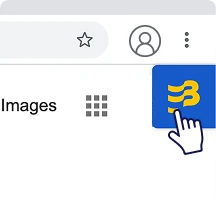
Simply click on the floating button to the right of your browser to open the menu.
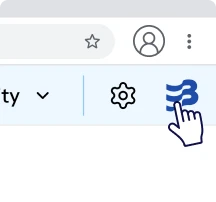
To minimize the menu of widgets by clicking on the logo to bring it back to a floating button.
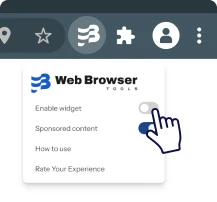
To remove the floating button from your browser, click on the extension icon located at the top right of your browser toolbar and turn toggle OFF for Enable widget.
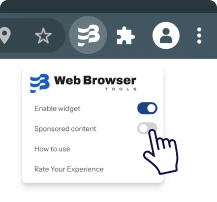
In order to disable sponsored content to show up, click on the extension icon located at the top right of your browser toolbar and turn toggle OFF for Sponsored content.